
Built entirely on Sogni
How this was made.
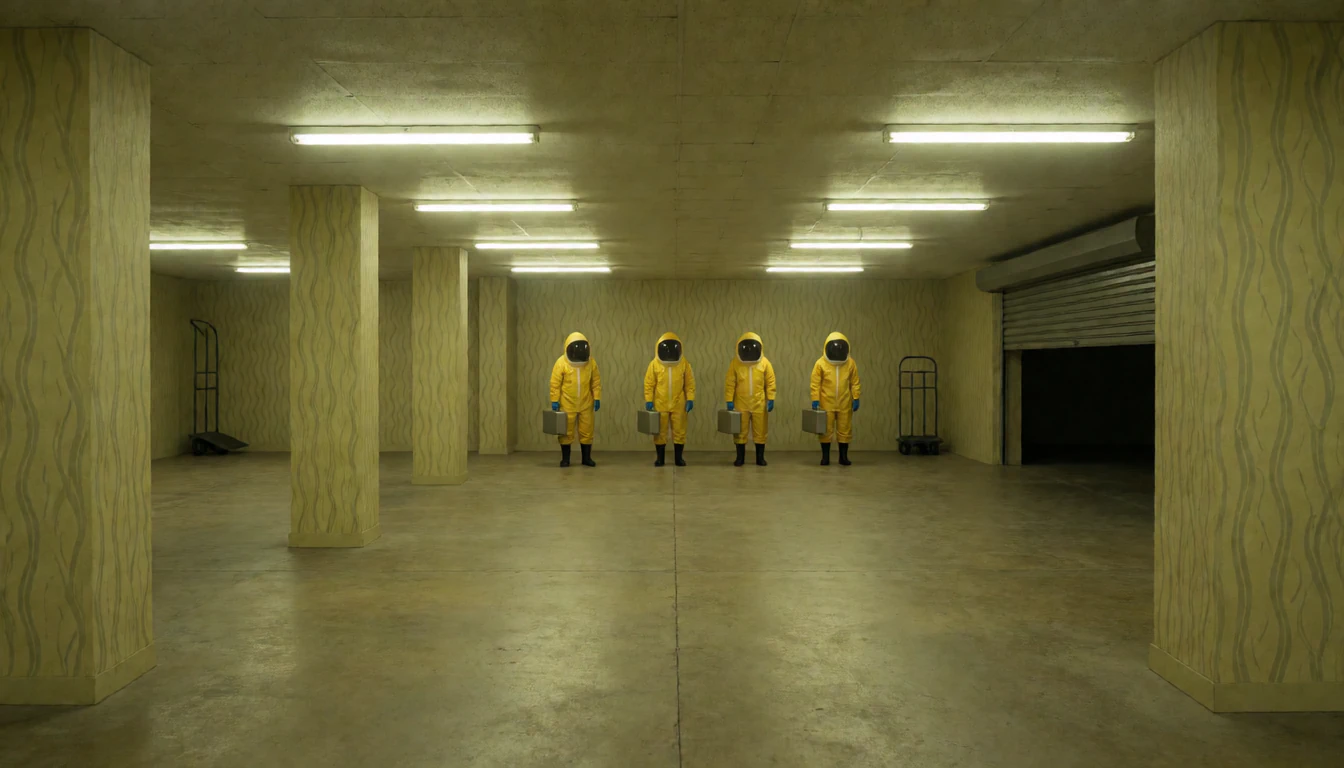
The loading hall, from The Ninth Admission. One still, given to the video model as both its first frame and its last, so the five seconds it rendered repeat without a seam.Step inside 18+ horror
The Dream Thread and The Ninth Admission were made end to end on the Sogni Supernet — every image, every crossing, every voice, every piece of music and every 3D figure generated there, and every line of code written by an LLM agent driving those models through the Sogni Creative Agent skill. Nothing in them is stock, licensed or hand-modelled. The Long White Cloud starts from something real instead: Mark’s photographs from a trip through Aotearoa New Zealand. Every one of its places is one of those photographs, never redrawn, and everything that moves between and inside them, and the two voices that tell it, was generated the same way. Here is the whole recipe, so you can build your own.
The agents wrote up the build themselves, mistakes included. How Claude Code and Codex agents built Sogni World Build your own from an idea or from your photos, with your own agent: the pipeline is open source.The Sogni Worlds Kit on GitHub
The stack
Seven models, in this order.
Each one takes the exact output of the last. Model ids are what you pass to the Sogni API — they are the same names the agent used to build this.
Every picture, film and song below keeps its recipe. Prompt shows the exact words the model was given, read from that file’s receipt, and Try it yourself the call that makes it again.
Set up onceSet up once, then paste any recipe below into the gap
The code runs on the Sogni SDK, with an API key from your Sogni dashboard. Each run is charged to your account like any other job, and the same seed is a close start rather than a promise of the same file.
- Needs
- Node 22 or newer, and a Sogni API key
// npm install @sogni-ai/sogni-client, then save this as sogni.mjs
import { readFile, writeFile } from 'node:fs/promises';
import { SogniClient } from '@sogni-ai/sogni-client';

const sogni = await SogniClient.createInstance({
  appId: 'my-first-world', // any name for your script; keep it between runs
  network: 'fast', // video runs on the fast network
  apiKey: process.env.SOGNI_API_KEY,
});
await sogni.projects.waitForModels();

// Pictures are uploaded as bytes, so fetch the originals this site serves.
const picture = async url => Buffer.from(await (await fetch(url)).arrayBuffer());
// A finished file’s link lasts 30 minutes, so save it straight away.
const save = async (url, file) => writeFile(file, await picture(url));

// Paste a recipe here.

sogni.dispose();- 01
Draw the places
krea2_turbo_fp8_scaledText to image. Every scene starts as one still, generated wide and left at native resolution.
In this build: A scene still is the source of truth for everything downstream, so it is generated once and never screenshotted, cropped or re-saved. Each one keeps its own SHA-256, and the app refuses to load a still whose bytes have changed.
The loading hall in The Ninth Admission, exactly as the model drew it from its prompt. The film at the top of this page begins and ends on it. The promptThe loading hall, the still under the film at the top of this page
A photorealistic cinematic vast low pale-yellow hall at the edge of a Backrooms office labyrinth, like an empty loading dock at night: bare concrete floor, square pillars papered in nicotine-yellow wallpaper with a faint wavy pattern, long fluorescent strips overhead casting flat greenish-yellow light. Wide 28mm first-person view at standing eye level. Four figures in yellow hooded hazmat suits with dark glass faceplates stand in a row facing the camera at the middle distance, motionless, two of them holding steel briefcases. A steel hand truck leans against the far wall; a steel roller door stands half open at the far right with darkness beyond. Tactile concrete, vinyl suit fabric and glass, no text.
- Model
- krea2_turbo_fp8_scaled
- Size
- 1344 × 768
- Steps
- 8
- Seed
- 9200108
const prompt = "A photorealistic cinematic vast low pale-yellow hall at the edge of a Backrooms office labyrinth, like an empty loading dock at night: bare concrete floor, square pillars papered in nicotine-yellow wallpaper with a faint wavy pattern, long fluorescent strips overhead casting flat greenish-yellow light. Wide 28mm first-person view at standing eye level. Four figures in yellow hooded hazmat suits with dark glass faceplates stand in a row facing the camera at the middle distance, motionless, two of them holding steel briefcases. A steel hand truck leans against the far wall; a steel roller door stands half open at the far right with darkness beyond. Tactile concrete, vinyl suit fabric and glass, no text."; const project = await sogni.projects.create({ type: 'image', modelId: 'krea2_turbo_fp8_scaled', positivePrompt: prompt, width: 1344, height: 768, steps: 8, guidance: 1, seed: 9200108, numberOfMedia: 1, outputFormat: 'png', }); const [still] = await project.waitForCompletion(); await save(still, 'loading-hall.png'); - 02
Keep the same character, somewhere new
krea2_identity_edit_sogni_v0_3_alphaImage editing with context references. Give it two pictures — the world, and who has to stay recognizable — and it composes a new place with the same character in it.
In this build: Simon’s saved reference image keeps him recognizable across The Dream Thread. Each new scene uses that image to preserve his appearance. A name is not an identity lock. The reference image is.
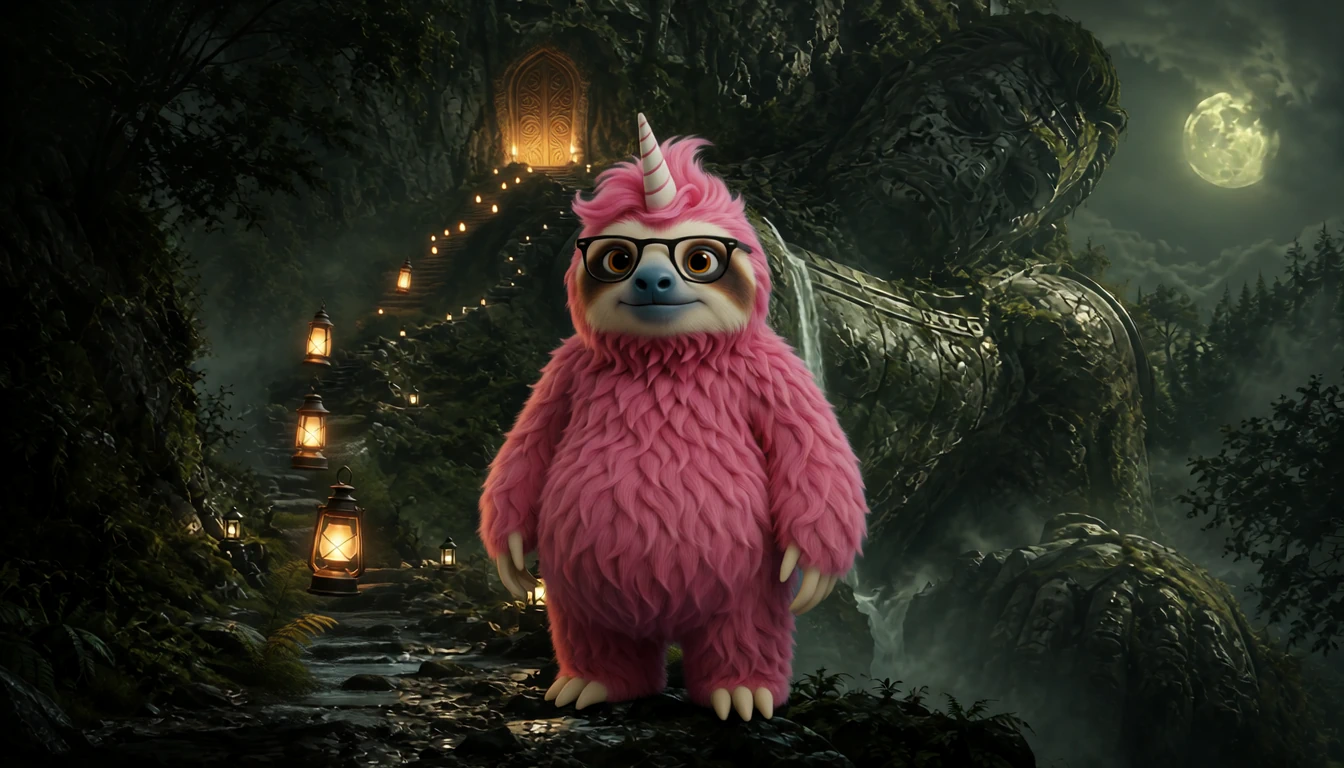
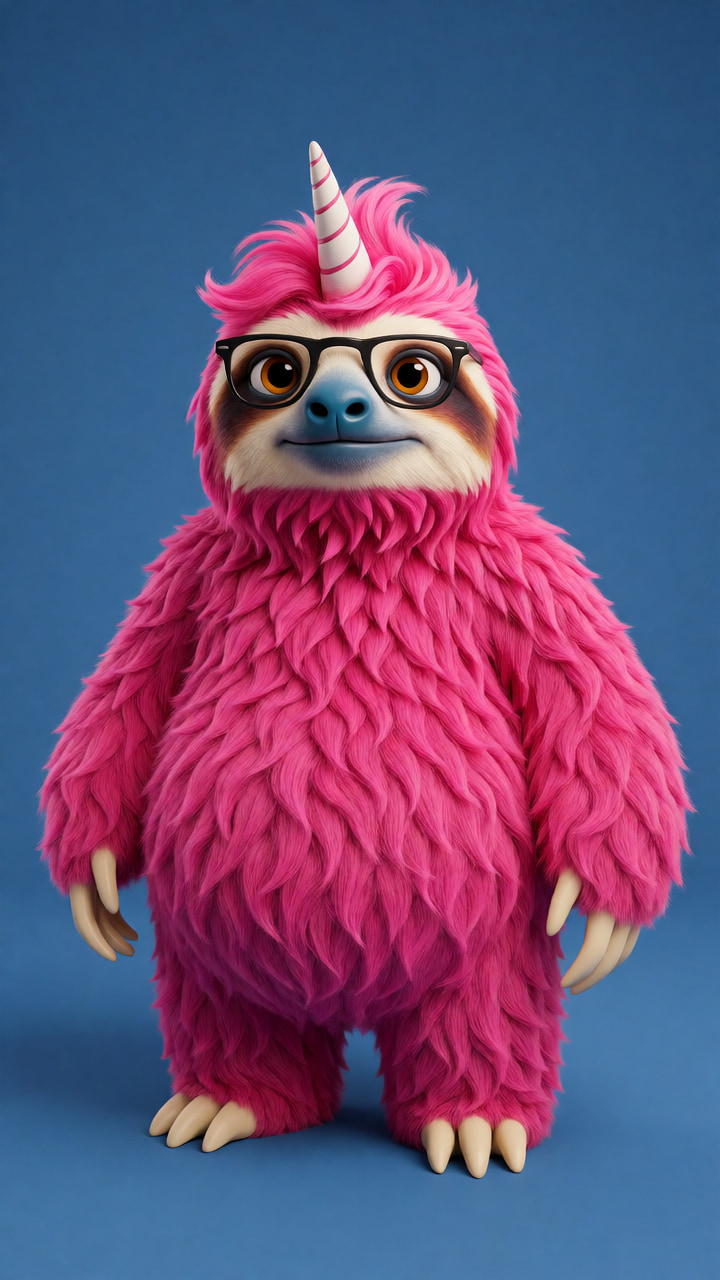
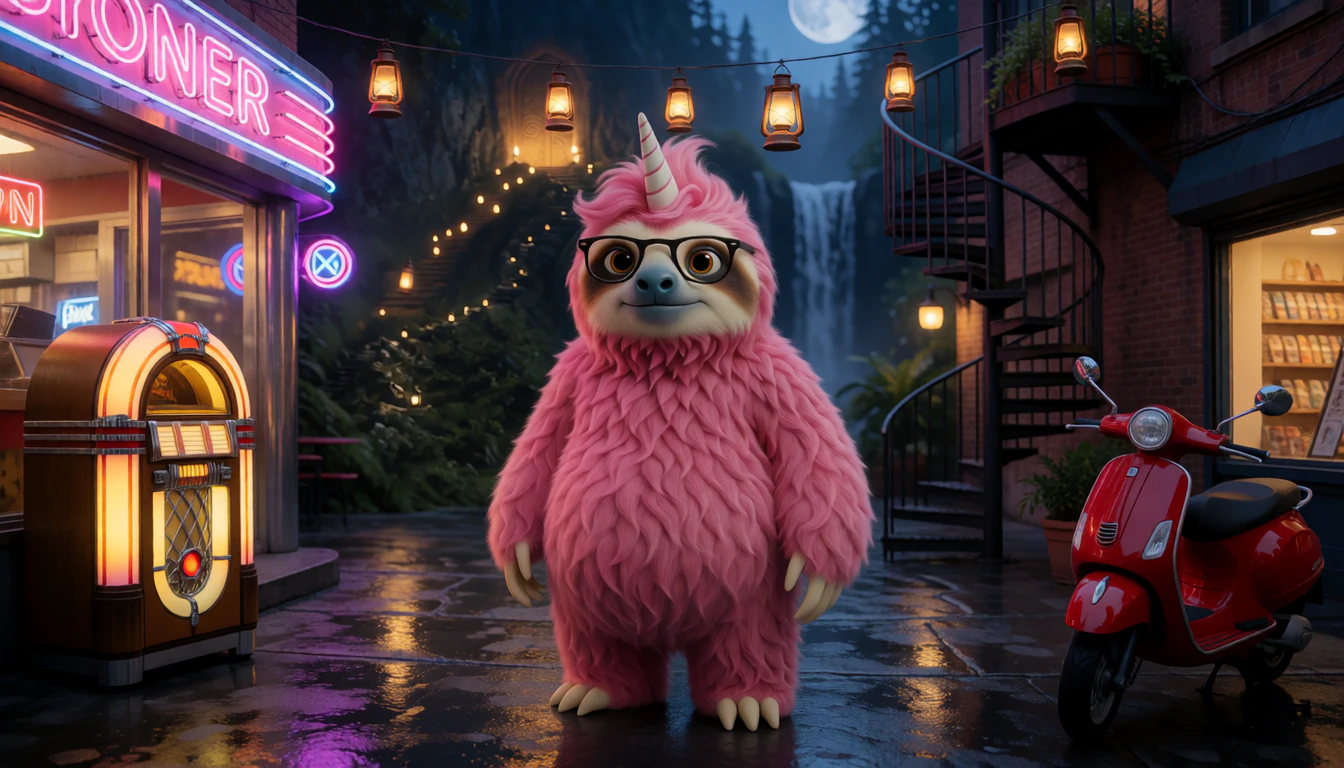
Picture 1 is The Dream Thread Wakes, the first place in The Dream Thread, and picture 2 is Simon’s reference. Neon After Hours is what came out. The rest of this page follows picture 1. The promptNeon After Hours, from the two pictures above it
Keep the exact pink fuzzy Sogni sloth from reference image 2: dense bubblegum-pink fur, black rectangular glasses, a blue oval nose, one striped pastel unicorn horn, rounded ears, long arms and the same friendly facial proportions. Keep this single mascot visibly present and full-bodied, around one third of the picture height. No other sloths, duplicate limbs, writing, logos or borders. Compose a complete 1344 by 768 landscape image without cropping the supplied references. The character is the explorer, not a costume worn by a human. Continue from the first reference: the floating lanterns have led the pink sloth into a welcoming, rain-polished city courtyard after dark. Cinematic contemporary street photography with soft neon reflections, blue hour and warm shop windows; a grounded non-fantasy urban detour. The sloth stands center midground, curious and relaxed. Make three distinct, unobstructed objects beautifully legible and well separated: a glowing vintage jukebox outside a diner at the left foreground; a freestanding metal spiral staircase to a planted rooftop at the right midground; and a cherry-red motor scooter parked at the lower right. Keep each complete object inside the frame, with clear negative space around its silhouette. No readable signage.
- Model
- krea2_identity_edit_sogni_v0_3_alpha
- Pictures
- The Dream Thread Wakes, then Simon’s reference
- Size
- 1344 × 768
- Steps
- 10
- Seed
- 360912
const prompt = `Keep the exact pink fuzzy Sogni sloth from reference image 2: dense bubblegum-pink fur, black rectangular glasses, a blue oval nose, one striped pastel unicorn horn, rounded ears, long arms and the same friendly facial proportions. Keep this single mascot visibly present and full-bodied, around one third of the picture height. No other sloths, duplicate limbs, writing, logos or borders. Compose a complete 1344 by 768 landscape image without cropping the supplied references. The character is the explorer, not a costume worn by a human. Continue from the first reference: the floating lanterns have led the pink sloth into a welcoming, rain-polished city courtyard after dark. Cinematic contemporary street photography with soft neon reflections, blue hour and warm shop windows; a grounded non-fantasy urban detour. The sloth stands center midground, curious and relaxed. Make three distinct, unobstructed objects beautifully legible and well separated: a glowing vintage jukebox outside a diner at the left foreground; a freestanding metal spiral staircase to a planted rooftop at the right midground; and a cherry-red motor scooter parked at the lower right. Keep each complete object inside the frame, with clear negative space around its silhouette. No readable signage.`; const project = await sogni.projects.create({ type: 'image', modelId: 'krea2_identity_edit_sogni_v0_3_alpha', positivePrompt: prompt, contextImages: [ await picture('https://worlds.sogni.ai/mascot-world/junction.png'), // reference image 1 await picture('https://worlds.sogni.ai/mascot-world/mascot-original.jpg'), // reference image 2, Simon ], width: 1344, height: 768, steps: 10, guidance: 1, seed: 360912, numberOfMedia: 1, outputFormat: 'png', }); const [place] = await project.waitForCompletion(); await save(place, 'neon-after-hours.png'); - 03
Make the objects clickable
sam3_image_segment_bf16Segment Anything 3. Ask for an object by name, by point, or by box, and it returns a pixel mask.
In this build: Selections start with returned masks, traced to SVG contours and kept with the source image’s hash. We refine geometric edges where needed and preserve intricate organic shapes.
Every mask SAM 3 returned for that picture — the sleeping giant, the lanterns, the door in the cliff, Simon — drawn the way a world draws them. Point at one. The promptThe lanterns’ outline, in the picture above
lantern
One word, and a box drawn around one lantern to show which kind. SAM 3 returned every lantern along the path.
- Model
- sam3_image_segment_bf16
- Box
- 21.5%–28.1% across, 61.5%–77.9% down
- Threshold
- 0.5
const project = await sogni.projects.create({ type: 'image', modelId: 'sam3_image_segment_bf16', positivePrompt: 'Select the indicated object.', startingImage: await picture('https://worlds.sogni.ai/mascot-world/junction.png'), sam3Prompt: { text: 'lantern', boxes: [{ x0: 0.215, y0: 0.615, x1: 0.281, y1: 0.779 }], threshold: 0.5, multimask: false, }, width: 1344, height: 768, steps: 1, guidance: 1, numberOfMedia: 1, }); const [mask] = await project.waitForCompletion(); // black and white, the size of the picture await save(mask, 'lanterns-mask.png'); - 04
Travel between them, and let them speak
minimax-h3-fastvideo-int8_flf2v_turbo_2stageminimax-h3-fastvideo-int8_flf2v_turbominimax-h3-fl2va-fp8_flf2v_turboFirst-frame / last-frame video with generated audio in the same pass. Give it the still you are leaving and the still you are arriving at, and it renders the journey between them.
In this build: The original stills anchor the composition at both ends. The finished video can still change their contrast and detail, so inspect the actual handoff; the polish checklist below explains how to match display frames in a custom player. The same model, anchored on one still at both ends, is how characters talk — the scene holds, breathes and is spoken over. The newest films are rendered in two stages, straight to 2K; the picture switch inside a world chooses between those and the lighter 720p.
“Follow the lanterns”: 10 seconds that begin on the picture above and end on Neon After Hours. The prompt“Follow the lanterns”, the film above
How the reference pictures align with the target video — Picture 1 (from Shot 1) aligns with the 0.00-second mark of the target video; Picture 2 (from Shot 1) aligns with the 10.13-second mark of the target video. integrated_multimodal_description: [Shot 1] Photorealistic fantasy footage with a moonlit cinematic look, one continuous shot. In the position and framing established by Picture 1, the pink sloth with long bubblegum-pink fur, round black glasses, a blue nose and a striped horn stands on the dark forest path beside the lantern posts, with the sleeping giant and the moon behind him. He turns left and trots down the lantern-lit stone steps, and the camera follows in a smooth tracking shot a few paces behind him as the lanterns pass the lens one after another, each glowing brighter than the last. The path curves around a huge moss-covered boulder, and its dark mossy face slides across the lens and fills the frame. As the boulder clears, the steps lead down onto a rain-wet cobbled street at night under strings of hanging lanterns, with a waterfall falling through the trees at the end of the street. He hops off the last step onto the wet stones, and the camera arcs around his left side past a glowing jukebox beside a diner window with a pink neon sign, while a red scooter stands beside a spiral iron staircase at the right. He stops in the middle of the street, turns to face the camera and stands with his arms at his sides, settling into the pose, spacing, and composition established by Picture 2 at the end of the shot. The sloth remains silent. overall_soundscape: Crickets, a trickling stream and the soft creak of lantern chains, padded footsteps on stone steps, then rain pattering on cobbles, splashing footsteps, the hiss of a waterfall and a jukebox song playing faintly from the diner. non_diegetic_music: N/A
- Model
- minimax-h3-fastvideo-int8_flf2v_turbo_2stage
- Frames
- The Dream Thread Wakes first, Neon After Hours last
- Size
- 1344 × 768, delivered at 2688 × 1536
- Length
- 10.13 s at 24 fps
- Steps
- 4
- Seed
- 910221
const prompt = `How the reference pictures align with the target video — Picture 1 (from Shot 1) aligns with the 0.00-second mark of the target video; Picture 2 (from Shot 1) aligns with the 10.13-second mark of the target video. integrated_multimodal_description: [Shot 1] Photorealistic fantasy footage with a moonlit cinematic look, one continuous shot. In the position and framing established by Picture 1, the pink sloth with long bubblegum-pink fur, round black glasses, a blue nose and a striped horn stands on the dark forest path beside the lantern posts, with the sleeping giant and the moon behind him. He turns left and trots down the lantern-lit stone steps, and the camera follows in a smooth tracking shot a few paces behind him as the lanterns pass the lens one after another, each glowing brighter than the last. The path curves around a huge moss-covered boulder, and its dark mossy face slides across the lens and fills the frame. As the boulder clears, the steps lead down onto a rain-wet cobbled street at night under strings of hanging lanterns, with a waterfall falling through the trees at the end of the street. He hops off the last step onto the wet stones, and the camera arcs around his left side past a glowing jukebox beside a diner window with a pink neon sign, while a red scooter stands beside a spiral iron staircase at the right. He stops in the middle of the street, turns to face the camera and stands with his arms at his sides, settling into the pose, spacing, and composition established by Picture 2 at the end of the shot. The sloth remains silent. overall_soundscape: Crickets, a trickling stream and the soft creak of lantern chains, padded footsteps on stone steps, then rain pattering on cobbles, splashing footsteps, the hiss of a waterfall and a jukebox song playing faintly from the diner. non_diegetic_music: N/A`; const project = await sogni.projects.create({ type: 'video', modelId: 'minimax-h3-fastvideo-int8_flf2v_turbo_2stage', positivePrompt: prompt, referenceImage: await picture('https://worlds.sogni.ai/mascot-world/junction.png'), // Picture 1, the first frame referenceImageEnd: await picture('https://worlds.sogni.ai/mascot-world/neon-after-hours.png'), // Picture 2, the last frame width: 1344, height: 768, // two stages, delivered at 2688 × 1536 duration: 10.125, fps: 24, steps: 4, guidance: 1, seed: 910221, numberOfMedia: 1, }); const [film] = await project.waitForCompletion(); // an MP4 with its sound await save(film, 'follow-the-lanterns.mp4'); - 05
Score it
minimax_music3Instrumental music from a prompt, long enough to loop.
In this build: A song for every place, crossfaded as you move and ducked under any clip that has its own audio. Each song has a sleeve, drawn by the image model from step one, and a small player names the song once, the first time you actually hear it.
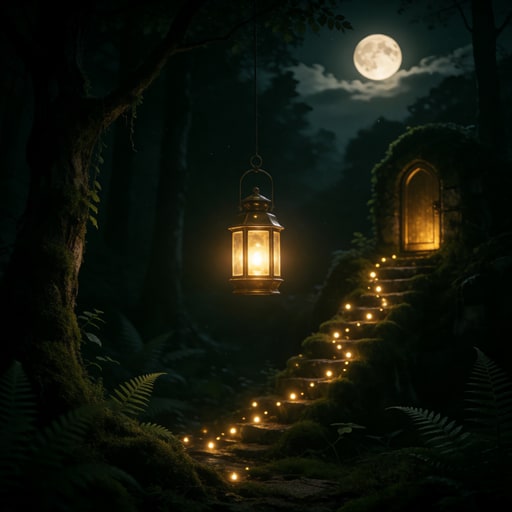
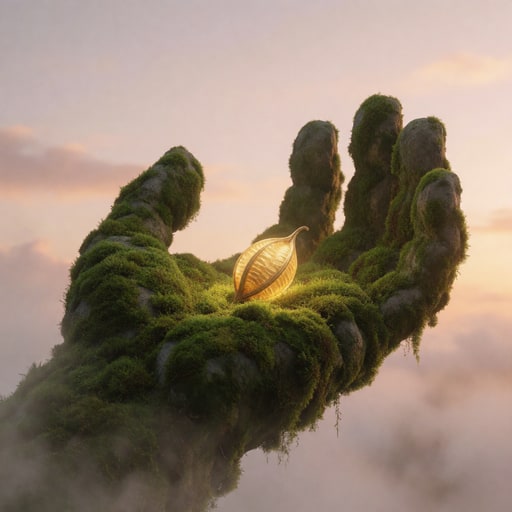
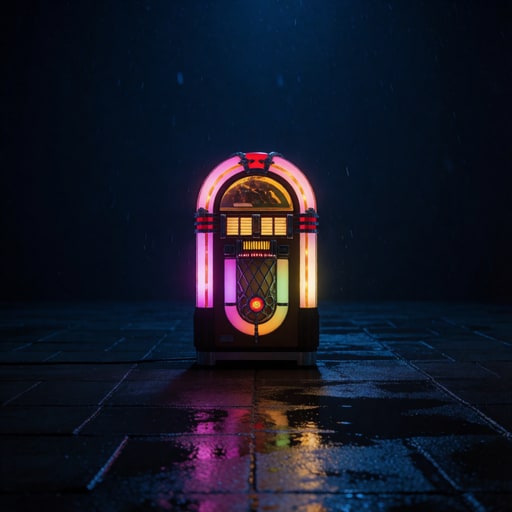
“The Luminous Junction”, the junction’s song, and eight more of the 23, by their sleeves. The prompt“The Luminous Junction”, the junction’s song
Instrumental only; no vocals, speech, choir, or vocal textures. Sophisticated cinematic psychedelic dream-folk at roughly 78 BPM, written as an exploration theme for the Sogni World junction. Glass marimba and celesta trace a curious five-note motif over warm upright bass, brushed frame drums, low bowed strings, and granular forest ambience. The harmony is mysterious but inviting, with subtle spatial reversals and shimmering details suggesting many branching paths without becoming busy or bombastic. [Intro] sparse motif and distant textures. [Development] the motif passes between acoustic and impossible electronic timbres as the pulse gathers. [Return] resolve gently to the opening tonal center with a clean loop-friendly final bar, no dramatic ending, and enough tail to crossfade seamlessly.
- Model
- minimax_music3
- Length
- up to 45 s; it wrote 13.15 s
- Steps
- 30
- Guidance
- 1.7
- Seed
- 527522736
const prompt = "Instrumental only; no vocals, speech, choir, or vocal textures. Sophisticated cinematic psychedelic dream-folk at roughly 78 BPM, written as an exploration theme for the Sogni World junction. Glass marimba and celesta trace a curious five-note motif over warm upright bass, brushed frame drums, low bowed strings, and granular forest ambience. The harmony is mysterious but inviting, with subtle spatial reversals and shimmering details suggesting many branching paths without becoming busy or bombastic. [Intro] sparse motif and distant textures. [Development] the motif passes between acoustic and impossible electronic timbres as the pulse gathers. [Return] resolve gently to the opening tonal center with a clean loop-friendly final bar, no dramatic ending, and enough tail to crossfade seamlessly."; const project = await sogni.projects.create({ type: 'audio', modelId: 'minimax_music3', positivePrompt: prompt, duration: 45, steps: 30, guidance: 1.7, promptStrength: 1.7, seed: 527522736, numberOfMedia: 1, outputFormat: 'mp3', }); const [song] = await project.waitForCompletion(); await save(song, 'the-luminous-junction.mp3'); - 06
Stand things up in 3D
pixal3d_int8_i23dImage to 3D. Hand it an object on transparency and it returns a GLB.
In this build: The input costs nothing to generate: the retained still, cut out along its SAM 3 mask and cropped to the object. What you turn over is literally the thing standing in the scene. Ask for far fewer triangles than the default — a browser wants 60,000, not 700,000 — and do not let anything downscale the cut-out on the way in. A third of the pixels lost off a portrait is a third lost off the face, which is the only part anyone looks at.

Simon, cut out of his picture in Freshly Baked Sunshine by step three. Step six built a 59,907-triangle figure from that cut-out. The promptSimon as a figure, from the cut-out above
a small round pink furry sloth character standing upright, with round black glasses and a short white unicorn horn
Not a caption: these words told Pixal3D which thing in the picture to build. It now finds the subject on its own, so they are optional.
- Model
- pixal3d_int8_i23d
- Faces
- 60,000
- Textures
- 2048 colour, 1024 normals, 512 shadow
const prompt = "a small round pink furry sloth character standing upright, with round black glasses and a short white unicorn horn"; const project = await sogni.projects.create({ type: 'image', modelId: 'pixal3d_int8_i23d', positivePrompt: prompt, startingImage: await picture('https://cdn.sogni.ai/sogni-world/v1/objects/icons/sloth.5af6e0604d6000f7d8eab54e298164b616a5e2e16307ba2e827e2482293cb72b.webp'), // the cut-out meshTargetFaces: 60000, textureSize: 2048, normalMapSize: 1024, ambientOcclusionSize: 512, numberOfMedia: 1, }); const [figure] = await project.waitForCompletion(); // a .glb await save(figure, 'simon.glb'); - 07
Give a recurring character one voice
qwen3_tts_1.7b_voice_clone_bf16minimax-h3-ref2va-fp8_r2v_2stageClone a voice once and speak any line in it, so a character sounds like themselves in every scene.
In this build: Most of the dialogue in these worlds came out of the video model itself, which generates picture and sound together and casts each speaker from a written description. Aleyna is the exception. She has a real recording, so every line she speaks is her cloned voice, and the video model animates her to that audio. Describing her in words would have cast a stranger.

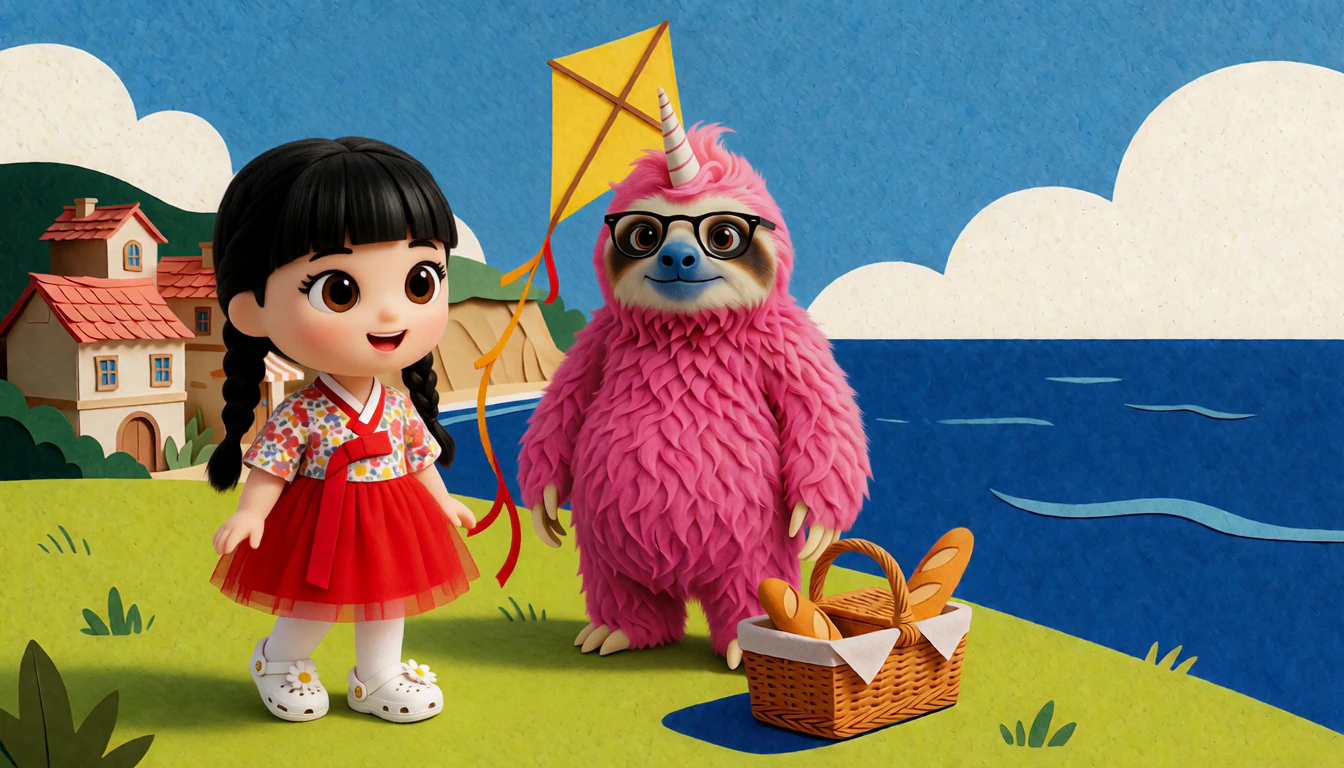
Her figure, and the 19 seconds she speaks at the kite festival: step two put the figure into the place, and the video model performed her to her cloned voice. The promptAleyna’s scene at the kite festival, the film above
subject_definitions: <Image 1> is the scene and the two characters standing in it: Aleyna, a small girl with black hair in a blunt fringe and two braids, a floral top and a red skirt, standing at the left; and a pink furry sloth standing beside her. <Audio 1> is the conversation. summary: reference generation + audio reuse. Aleyna speaks her words in <Audio 1>, in the place and wardrobe of <Image 1>. retention_analysis: <Image 1>: fully_preserved — the setting, both characters, their positions, wardrobe and the handmade paper style are kept exactly. <Audio 1>: fully_copy — the voices, words and timing are used as they are, not regenerated. detailed_description: [Shot 1] A locked wide shot shows the paper-and-felt coastal scene in <Image 1>, Aleyna at the left and the pink sloth beside her. Aleyna speaks her recorded lines with a warm, animated expression and mouth timing following <Audio 1>. During the recorded off-camera reply she listens with her mouth closed. Her hands make small open-palmed gestures and settle beside her red skirt. The sloth listens. The yellow diamond kite stays above his shoulder on its string, its ribbon tail fluttering gently. The bread basket rests on the grass. The camera holds at eye level throughout. overall_soundscape: Exactly <Audio 1>, over a light sea breeze on an open hill. non_diegetic_music: N/A
The first of the two films joined for her scene. Her voice was cloned from a recording of her, which is not published; any short, clean recording of a speaker and its words will do.
- Model
- minimax-h3-ref2va-fp8_r2v_2stage
- Picture 1
- the kite festival with her in it
- Audio 1
- her line in her cloned voice, then Simon’s reply
- Size
- 1344 × 768, delivered at 2688 × 1536
- Length
- 10.13 s at 24 fps
- Steps
- 20
- Seed
- 920260066
// 1. The line, in the speaker’s cloned voice.
const speech = await sogni.projects.create({
  type: 'audio',
  modelId: 'qwen3_tts_1.7b_voice_clone_bf16',
  positivePrompt: "Hello again. I was wondering how long it would take you to look up.",
  referenceAudio: await readFile('speaker.m4a'), // a short, clean recording of the speaker
  referenceText: 'Every word of that recording, as it was said.',
  language: 'english',
  numberOfMedia: 1, outputFormat: 'mp3',
});
const [line] = await speech.waitForCompletion();
await save(line, 'line.mp3');
// Put the reply after it and save the pair as conversation.wav, 2 to 15 seconds long.

// 2. The scene, performed to that track.
const prompt = `subject_definitions:
<Image 1> is the scene and the two characters standing in it: Aleyna, a small girl with black hair in a blunt fringe and two braids, a floral top and a red skirt, standing at the left; and a pink furry sloth standing beside her. <Audio 1> is the conversation.

summary:
reference generation + audio reuse. Aleyna speaks her words in <Audio 1>, in the place and wardrobe of <Image 1>.

retention_analysis:
<Image 1>: fully_preserved — the setting, both characters, their positions, wardrobe and the handmade paper style are kept exactly.
<Audio 1>: fully_copy — the voices, words and timing are used as they are, not regenerated.

detailed_description:
[Shot 1] A locked wide shot shows the paper-and-felt coastal scene in <Image 1>, Aleyna at the left and the pink sloth beside her. Aleyna speaks her recorded lines with a warm, animated expression and mouth timing following <Audio 1>. During the recorded off-camera reply she listens with her mouth closed. Her hands make small open-palmed gestures and settle beside her red skirt. The sloth listens. The yellow diamond kite stays above his shoulder on its string, its ribbon tail fluttering gently. The bread basket rests on the grass. The camera holds at eye level throughout.

overall_soundscape:
Exactly <Audio 1>, over a light sea breeze on an open hill.

non_diegetic_music: N/A`;

const project = await sogni.projects.create({
  type: 'video',
  modelId: 'minimax-h3-ref2va-fp8_r2v_2stage',
  positivePrompt: prompt,
  referenceImage: await picture('https://worlds.sogni.ai/mascot-world/kite-festival-aleyna.webp'), // <Image 1>
  referenceAudio: await readFile('conversation.wav'), // <Audio 1>
  width: 1344, height: 768, // two stages, delivered at 2688 × 1536
  duration: 10.125, fps: 24,
  steps: 20, guidance: 1, seed: 920260066,
  numberOfMedia: 1,
});
const [film] = await project.waitForCompletion();
await save(film, 'aleyna.mp4'); // then lay conversation.wav over it as its sound, as the finished scene does

The third world
Or start from a photograph.
The Long White Cloud is 22 photographs from two weeks in Aotearoa New Zealand, told in the order of Mark’s original video of the trip: from the round door at Hobbiton, through Milford Sound and the Tasman Glacier, and home again. Here is what changes when a place is real.
- A
Keep the photograph
No image model drew these places. Each is one of Mark’s own photographs from March and April 2023, with his grade and crop, and the recipe picks up at step three.
In this build: The photograph is still the source of truth. Each is converted to sRGB once, reduced only when it is wider than 2,496 pixels, never enlarged and never redrawn. Match a photograph to its place by looking at it, not by its filename: the first opening scene was the wrong picture for exactly that reason.
- B
Let it breathe
minimax-h3-fastvideo-int8_flf2v_turbo_2stageThe photograph is both the first frame and the last, so eight seconds of motion return exactly to it and repeat without a seam.
In this build: A still camera and a whole frame gently alive: water, cloud, grass, a coat in the wind, with Foley from the same pass. Everything runs at the photographs’ own 3:2, from a 1152×768 base delivered at 2304×1536. Check a size against the video model’s pixel budget first: 1248×832, only a little bigger, does not fit.
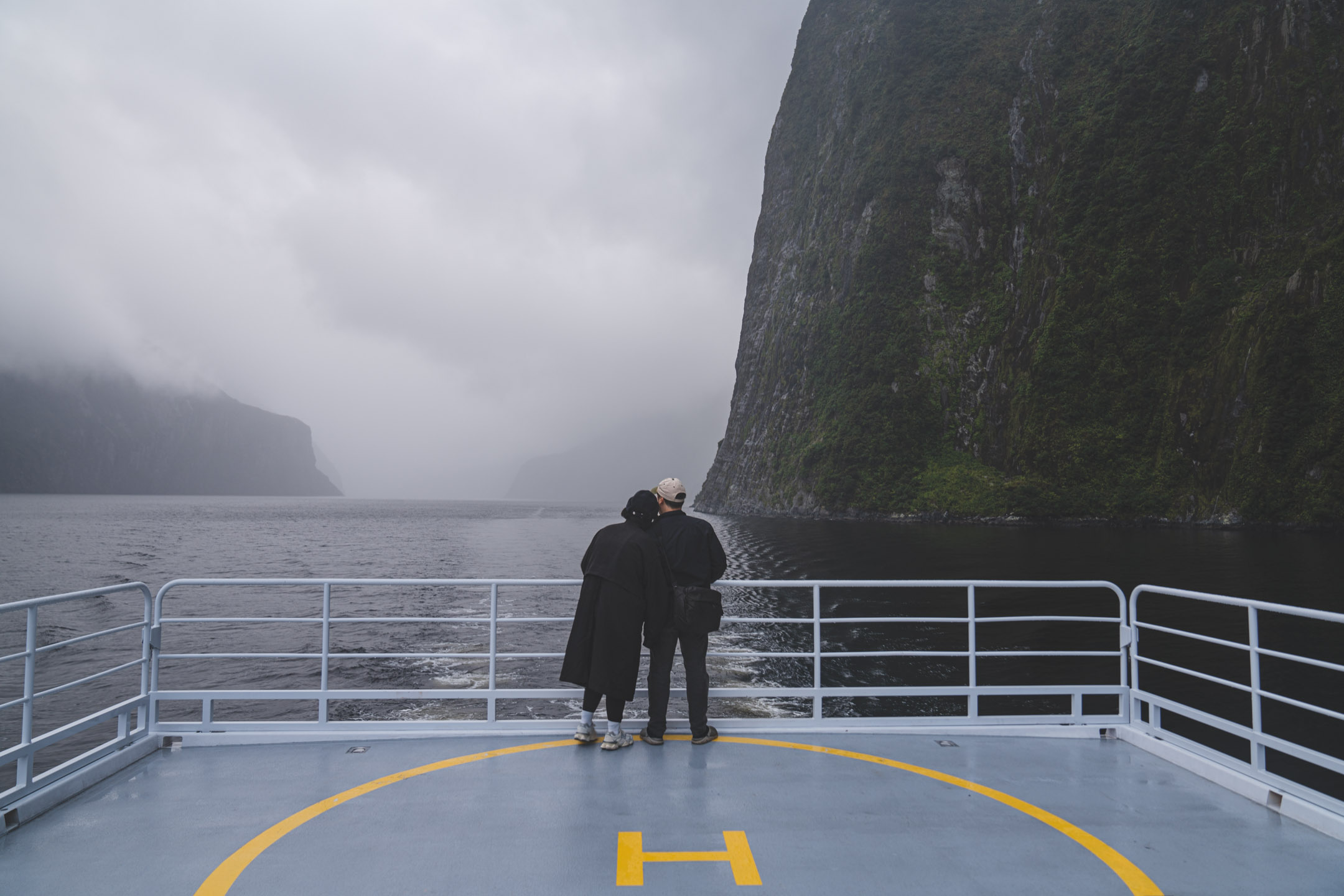
Milford Sound: the photograph, and the eight seconds that loop over it. Sound on. The promptTogether at the Rail, the eight seconds above
How the reference pictures align with the target video — Picture 1 (from Shot 1) aligns with the 0.00-second mark of the target video; Picture 2 (from Shot 1) aligns with the 8.00-second mark of the target video. integrated_multimodal_description: [Shot 1] Live-action, cinematic, a static wide shot holds the position and framing established by Picture 1: the two travellers stand close together at the center of the white stern railing, her head on his shoulder, the yellow H on the deck in front. She nestles closer against his shoulder and he tilts his head toward hers; her coat flutters in the wind. The wake churns across the dark water and mist drifts along the cliffs. The motion settles into the pose, spacing and composition established by Picture 2 at the end of the shot. overall_soundscape: The engine hums beneath the deck and the wake hisses; wind flutters the long coat and a waterfall murmurs far off. non_diegetic_music: N/A
- Model
- minimax-h3-fastvideo-int8_flf2v_turbo_2stage
- Frames
- the photograph, first and last
- Size
- 1152 × 768, delivered at 2304 × 1536
- Length
- 8 s at 24 fps
- Steps
- 4
- Seed
- 924240040
const prompt = `How the reference pictures align with the target video — Picture 1 (from Shot 1) aligns with the 0.00-second mark of the target video; Picture 2 (from Shot 1) aligns with the 8.00-second mark of the target video. integrated_multimodal_description: [Shot 1] Live-action, cinematic, a static wide shot holds the position and framing established by Picture 1: the two travellers stand close together at the center of the white stern railing, her head on his shoulder, the yellow H on the deck in front. She nestles closer against his shoulder and he tilts his head toward hers; her coat flutters in the wind. The wake churns across the dark water and mist drifts along the cliffs. The motion settles into the pose, spacing and composition established by Picture 2 at the end of the shot. overall_soundscape: The engine hums beneath the deck and the wake hisses; wind flutters the long coat and a waterfall murmurs far off. non_diegetic_music: N/A`; const project = await sogni.projects.create({ type: 'video', modelId: 'minimax-h3-fastvideo-int8_flf2v_turbo_2stage', positivePrompt: prompt, referenceImage: await picture('https://worlds.sogni.ai/the-long-white-cloud/sound-together.jpg'), // the first frame referenceImageEnd: await picture('https://worlds.sogni.ai/the-long-white-cloud/sound-together.jpg'), // and the last, the same photograph width: 1152, height: 768, duration: 8, fps: 24, steps: 4, guidance: 1, seed: 924240040, numberOfMedia: 1, }); const [loop] = await project.waitForCompletion(); await save(loop, 'milford-sound.mp4'); - C
Travel through something real
sam3_image_segment_bf16minimax-h3-fastvideo-int8_flf2v_turbo_2stageAn object in the photograph carries you on: a round door, a guitar’s sound hole, a helicopter, a breath fogging the lens.
In this build: Where the trip jumps a thousand kilometres, the jump happens as the camera passes through a doorway, a cloud, a water surface or a reflection, never as a morph between two pictures. A real person’s face is seen only where it is the photograph. In a film it stays turned away, covered or far off until the landing, because the model cannot promise to keep who they are through the middle.
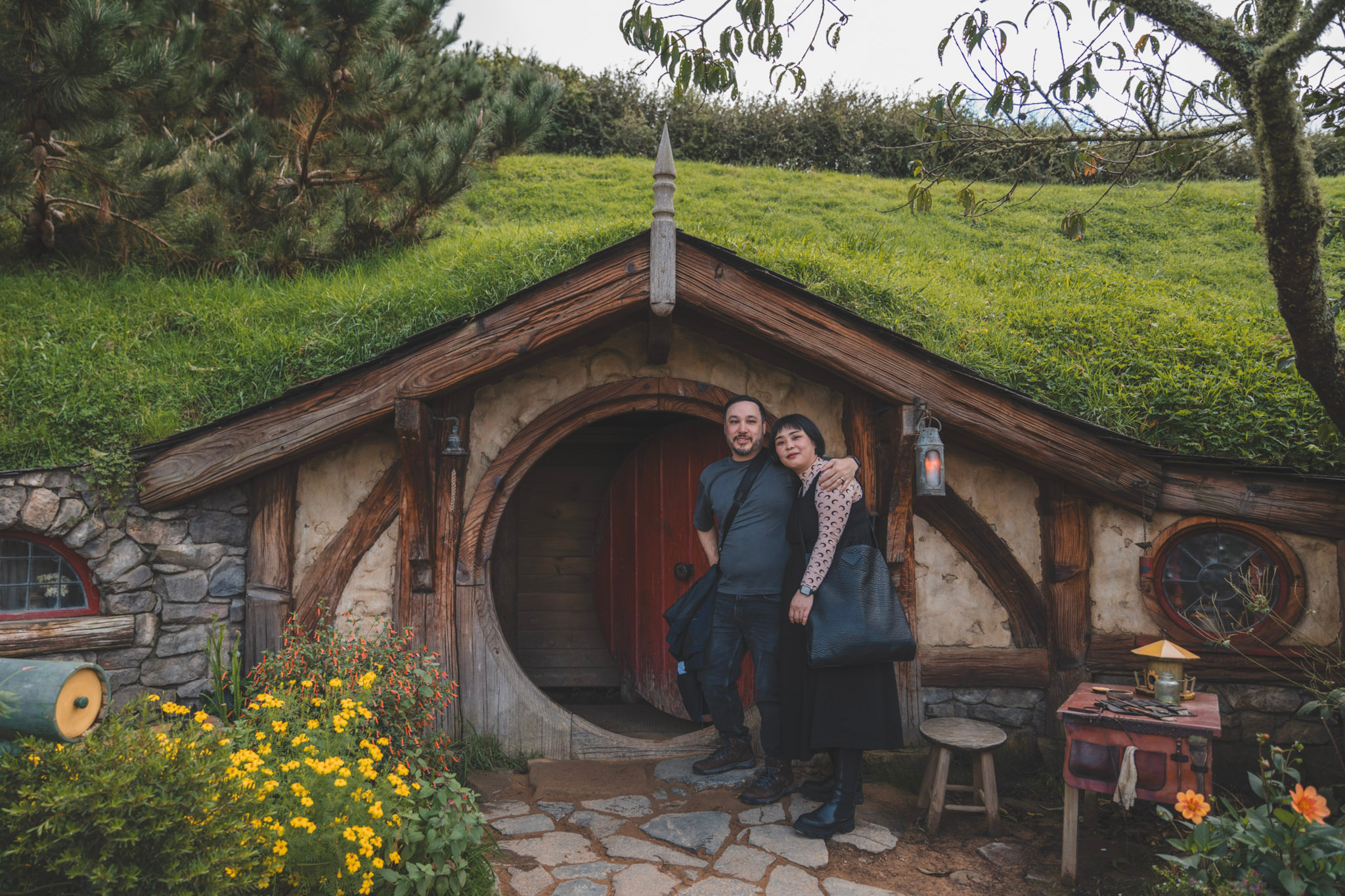
“Duck through the round door”: 12 seconds from Hobbiton to a clearing in the rainforest, the first crossing of the trip. Through the doorway, never a morph. The prompt“Duck through the round door”, the film above
How the reference pictures align with the target video — Picture 1 (from Shot 1) aligns with the 0.00-second mark of the target video; Picture 2 (from Shot 1) aligns with the 12.25-second mark of the target video. integrated_multimodal_description: [Shot 1] Live-action, cinematic, a wide eye-level shot begins in the position and framing established by Picture 1: the man in the grey t-shirt and the woman in the black pinafore dress stand arm in arm in front of the open round doorway of the hobbit hole, the red door swung inward, yellow marigolds below and a lantern glowing at each side. Cool green light glows from deep inside the hall. They glance at each other, grin, and duck through the low round doorway one after the other, her black tote bag swinging. The camera glides forward after them through the round doorway into a short earthen passage lined with roots and hanging ferns, the two of them walking ahead toward a bright green opening. They step out of the passage into the back of a watching crowd at the edge of a wet clearing in a rainforest of tree ferns and flax, and move aside to the left out of the frame. The camera settles behind the crowd, the dark heads of two spectators soft in the foreground at the left and right edges, looking past them at a carved wooden gateway where a row of bare-chested Māori performers in woven flax skirts plant their feet on the wet ground, gripping long wooden taiaha, and the lead warrior in the brown feathered cloak drops into a low wide stance. The camera settles into the pose, spacing and composition established by Picture 2 at the end of the shot. overall_soundscape: The open door creaks on its hinges as they brush past it; boots scuff across flagstones into a soft earthen passage. Birdsong gives way to rain dripping from tree-fern fronds, a hushed crowd shifting on wet gravel and bare feet slapping the wet ground in one heavy stamp. non_diegetic_music: N/A
- Model
- minimax-h3-fastvideo-int8_flf2v_turbo_2stage
- Frames
- The Round Door first, The Challenge last
- Size
- 1152 × 768, delivered at 2304 × 1536
- Length
- 12.25 s at 24 fps
- Steps
- 4
- Seed
- 924241009
const prompt = `How the reference pictures align with the target video — Picture 1 (from Shot 1) aligns with the 0.00-second mark of the target video; Picture 2 (from Shot 1) aligns with the 12.25-second mark of the target video. integrated_multimodal_description: [Shot 1] Live-action, cinematic, a wide eye-level shot begins in the position and framing established by Picture 1: the man in the grey t-shirt and the woman in the black pinafore dress stand arm in arm in front of the open round doorway of the hobbit hole, the red door swung inward, yellow marigolds below and a lantern glowing at each side. Cool green light glows from deep inside the hall. They glance at each other, grin, and duck through the low round doorway one after the other, her black tote bag swinging. The camera glides forward after them through the round doorway into a short earthen passage lined with roots and hanging ferns, the two of them walking ahead toward a bright green opening. They step out of the passage into the back of a watching crowd at the edge of a wet clearing in a rainforest of tree ferns and flax, and move aside to the left out of the frame. The camera settles behind the crowd, the dark heads of two spectators soft in the foreground at the left and right edges, looking past them at a carved wooden gateway where a row of bare-chested Māori performers in woven flax skirts plant their feet on the wet ground, gripping long wooden taiaha, and the lead warrior in the brown feathered cloak drops into a low wide stance. The camera settles into the pose, spacing and composition established by Picture 2 at the end of the shot. overall_soundscape: The open door creaks on its hinges as they brush past it; boots scuff across flagstones into a soft earthen passage. Birdsong gives way to rain dripping from tree-fern fronds, a hushed crowd shifting on wet gravel and bare feet slapping the wet ground in one heavy stamp. non_diegetic_music: N/A`; const project = await sogni.projects.create({ type: 'video', modelId: 'minimax-h3-fastvideo-int8_flf2v_turbo_2stage', positivePrompt: prompt, referenceImage: await picture('https://worlds.sogni.ai/the-long-white-cloud/round-door-v2.jpg'), // Picture 1, the first frame referenceImageEnd: await picture('https://worlds.sogni.ai/the-long-white-cloud/forest-stage.jpg'), // Picture 2, the last frame width: 1152, height: 768, duration: 12.25, fps: 24, steps: 4, guidance: 1, seed: 924241009, numberOfMedia: 1, }); const [film] = await project.waitForCompletion(); await save(film, 'duck-through-the-round-door.mp4'); - D
Tell it in their own voices
qwen3_tts_1.7b_voice_clone_bf16Each place is narrated once, like a phone call home: Mark’s voice cloned from 22.8 seconds of him speaking, and Jen’s from 15.6 seconds of hers.
In this build: Nobody speaks inside the films, because a voice the video model invents from a description would be a stranger’s. Listen to the end of every take: the voice model sometimes drops the last word, and “Best birthday ever.” said flat was cut short in all nine takes. As an exclamation it ends whole. The music is the one thing on this trip not made on the Supernet: “Slice of Heaven” by Dave Dobbyn with Herbs, the song from Mark’s original video of the trip.
- MarkSame view, better company.
- MarkMilford is one of the wettest places on Earth, which is exactly why every cliff is pouring.
- JenBest birthday ever!
The call home from Together at the Rail, in Mark’s and Jen’s cloned voices. Sound on. The linesWhat Mark and Jen say at Together at the Rail
Mark: Same view, better company. Mark: Milford is one of the wettest places on Earth, which is exactly why every cliff is pouring. Jen: Best birthday ever!
Each line is its own take, in its speaker’s voice, and the takes are joined in order.
- Model
- qwen3_tts_1.7b_voice_clone_bf16
- Language
- English
- Voices
- Mark’s from 22.8 s of him talking, Jen’s from 15.6 s of her talking
const prompt = "Milford is one of the wettest places on Earth, which is exactly why every cliff is pouring.";

const project = await sogni.projects.create({
  type: 'audio',
  modelId: 'qwen3_tts_1.7b_voice_clone_bf16',
  positivePrompt: prompt,
  referenceAudio: await readFile('my-voice.m4a'), // 15 to 30 seconds of you talking
  referenceText: 'Every word of that recording, as you said it.',
  language: 'english',
  numberOfMedia: 1, outputFormat: 'mp3',
});
const [speech] = await project.waitForCompletion();
await save(speech, 'line.mp3');
Lessons from building these worlds
The finishing touches.
Start small, then polish. Use this checklist with your agent when you’re assembling a world by hand. Custom playback and audio work may need changes to your own player.
Open the polish checklist 8 practical tips
The part that is not a model
One loop, repeated a few hundred times.
The agent never calls a model directly from application code. Every asset goes through the same four steps, which is what makes a world of this size survivable.
- 01Prepare
Write the exact job — prompt, seed, references, sizes — to a plan file. Nothing is submitted. A plan that already exists must reproduce byte for byte.
- 02Render
Journal the submission before sending it, so a job whose outcome is unknown is never silently duplicated. A completed item is never re-rendered.
- 03Verify natively
Probe the returned file. Frame counts, dimensions, audio channels, triangle counts, mask coverage, SHA-256. Then look at it.
- 04Retain
Publish to immutable, hash-addressed storage and write the receipt into a manifest. The app only ever reads the manifest, so it cannot ship an asset that was never verified.
What that added up to
The size of it.
Read straight off the shipped manifests.
- 3 worlds, 88 placesEvery one an original still or photograph, never a frame taken out of a video
- 171 things to clickEach outline traced from a mask SAM 3 returned for that exact picture
- 165 films between placesIncluding 18 ways for the hospital to end badly
- 22 journeys backRendered as films of their own in The Dream Thread, so the way home is a real trip
- 22 living photographsEach photograph given to the video model as its own first and last frame, so it breathes and repeats
- 15 spoken scenesPicture and voice generated together, so the mouth moves to the words
- 56 lines in real voicesMark and Jen narrate their own trip, in voices cloned from their recordings
- 23 songsOne for every place in The Dream Thread, each named once, the first time you hear it
- 8 collectible figuresCut out of the scenes they stand in, then rebuilt as meshes you can turn over
The long version, on the Sogni blog
How Claude Code and Codex agents built Sogni World.
This page is the recipe. The post is what following it was like, told by the agents that did: where the idea came from, the rules that keep Simon looking like Simon, the folder called “horror”, what an unlimited plan does to an agent, and why forgetful machines need receipts.
Read the postSogni Unlimited · One plan, more possibilities
One image starts a world. Keep the story growing.
Try another opening. Give a character a new path. Turn the scene in your head into a place someone can explore. With Sogni Unlimited, the images and videos you make here come out of your plan instead of your Spark or SOGNI balance.
Plans have fair-use limits and a render queue, and a few partner models cost extra. Prices and any free trial are shown at checkout.
Already subscribed? Sign in here with the same Sogni account and choose “Use my plan” when you create. If your plan can’t cover a step, we stop and tell you rather than charging your balance.
Your turn
Every model on this page is available to you.
Image generation, image editing, segmentation, video with sound, music, voice cloning and image-to-3D run on the Sogni Supernet — a community GPU network. Pay as you go, or use a Sogni Unlimited plan; either way you see the price before anything is made. Point your agent of choice at the Sogni Creative Agent skill and it can drive all of them.